<?xml version="1.0" encoding="utf-8"?><feed xmlns="http://www.w3.org/2005/Atom" ><generator uri="https://jekyllrb.com/" version="4.4.1">Jekyll</generator><link href="https://zyanklee.de/feed.xml" rel="self" type="application/atom+xml" /><link href="https://zyanklee.de/" rel="alternate" type="text/html" /><updated>2026-03-07T09:04:44-06:00</updated><id>https://zyanklee.de/feed.xml</id><title type="html">ZyanKLee.de</title><subtitle>blogging linux, open source, gaming, streaming and devops
</subtitle><entry><title type="html">Setup an AMD RX6800(XT)/RX6900 on Ubuntu 20.10</title><link href="https://zyanklee.de/2021/06/01/amd-rx6xxx-ubuntu-groovy/" rel="alternate" type="text/html" title="Setup an AMD RX6800(XT)/RX6900 on Ubuntu 20.10" /><published>2021-06-01T01:00:00-05:00</published><updated>2021-06-01T01:00:00-05:00</updated><id>https://zyanklee.de/2021/06/01/amd-rx6xxx-ubuntu-groovy</id><content type="html" xml:base="https://zyanklee.de/2021/06/01/amd-rx6xxx-ubuntu-groovy/"><![CDATA[<p>This is an opinionated guide on how I set up my computer which runs on an AMD Ryzen 7 5800X as well as an AMD RX6800 GPU.
There are few guides out there that cover the topic of setting up systems with AMD GPUs, but I found none to my liking.</p>

<p>Mostly my idea of a stable system and which PPAs to use differs from other authors’ - their basics were correct though
and I learned a lot by reading their articles and guides.
So I decided to write down my own guide in the hopes, that someone may benefit from that.</p>

<blockquote>
  <p>You are responsible for any damage inflicted to your computer by following this guide!
I can not be held responsible for broken computers and limbs, nor for any world ending
catastrophes!</p>
</blockquote>

<h1 id="prerequisite">Prerequisite</h1>

<ol>
  <li>fresh install of Ubuntu 20.10 Groovy Gorilla (this may perhaps work similarly with Hirsute, but I did not yet test it)</li>
  <li>a basic understanding of what Linux is and how Ubuntu can be configured</li>
  <li>basic terminal skills - you need to edit files and install packages</li>
  <li>Internet connection</li>
  <li>time and a beverage of your choice (remember: hydration is important)</li>
  <li>having read this guide in its entirety at least once - having it understood would be beneficial</li>
</ol>

<p>It’s best to copy’n’paste these commands instead of reading and writing them to avoid any typos and missing spaces. But
first read through them thoroughly to make sure I did not make any mistakes that may delete stuff you intend to keep.</p>

<p>I strongly recommend to first read this guide at
<a href="https://forum.level1techs.com/t/ubuntu-20-10-rx-6800-xt-how-to-steam-vulkan-up-and-runing-guide-wip/164137">Level1Techs Forum</a>
by Wendell, which explains most aspects in a very good and understandable way.</p>

<h1 id="installing-tools-and-utilities">Installing tools and utilities</h1>

<p>This chapter will mostly prepare the system for what is to come thereafter. At any time during these steps you can stop
and quit. Worst case you will have some tiny tools on your computer you may not need.</p>

<div class="language-plaintext highlighter-rouge"><div class="highlight"><pre class="highlight"><code>sudo apt-get update
sudo apt-get -y dist-upgrade
sudo apt-get -y install software-properties-common ppa-purge
</code></pre></div></div>

<h1 id="install-xanmod-kernel">Install Xanmod kernel</h1>

<p>This will install a more recent kernel - 5.12.8 at the time of writing - built by the great folks over at
<a href="https://www.xanmod.org">xanmod.org</a>. If you are interested in the reasoning for this step please
visit the <a href="https://forum.level1techs.com/t/ubuntu-20-10-rx-6800-xt-how-to-steam-vulkan-up-and-runing-guide-wip/164137">Level1Techs Forum</a>
where all the background has been explained by their member “Wendell” very well.</p>

<p>The only thing my opinion is differing is that I wish to have a system, where I do not need to remember to upgrade any
package every few weeks/months. So I’m trying to use constantly updated package repositories instead of the Ubuntu Linux Archive.</p>

<div class="language-plaintext highlighter-rouge"><div class="highlight"><pre class="highlight"><code>echo 'deb http://deb.xanmod.org releases main' \
  | sudo tee /etc/apt/sources.list.d/xanmod-kernel.list
wget -qO - https://dl.xanmod.org/gpg.key \
  | sudo apt-key --keyring /etc/apt/trusted.gpg.d/xanmod-kernel.gpg add -
sudo apt-get update
sudo apt-get install -y linux-xanmod-edge xanmod-repository

# you may instead need to install `intel-microcode` and `iucode-tool` with Intel CPU
sudo apt-get install -y amd64-microcode 
</code></pre></div></div>

<p>I experimented with the <a href="https://liquorix.net/">Liquorix</a> kernel as well. Though I do not remember
exactly why I preferred Xanmod, I believe it had something to do with performance while I tested with
Phoronix Test Suite. But you mileage may vary depending on your CPU, mainboard, RAM, disk, … -
so perhaps you get over there and have a look at it for yourself?</p>

<h1 id="install-newer-mesa">Install newer Mesa</h1>

<p>As the aforementioned Level1Techs Forum suggests to use Oibaf’s PPA, I initially did so, too.
Not long after I found the constant updates of the repository annoying enough to search for a
more conservative alternative.</p>

<p>And found it in the form of Kisak’s <a href="https://launchpad.net/~kisak/+archive/ubuntu/kisak-mesa">kisak-mesa fresh</a> PPA.
Kisak does not use the latest Git - as Oibaf does - but uses the latest stable release of mesa.</p>

<p>Kisak’s PPA is still updated every now and then (weekly, monthly - something like that), but not daily -
or even multiple times a day.</p>

<div class="language-plaintext highlighter-rouge"><div class="highlight"><pre class="highlight"><code>sudo add-apt-repository ppa:kisak/kisak-mesa
sudo apt-get update
sudo apt-get -y dist-upgrade

# not sure if this is needed, may be installed automatically as dependency of mesa_21.1.*
sudo apt-get -y install llvm-12
</code></pre></div></div>

<h1 id="install-amdvlk">Install AMDVLK</h1>

<p>The readme at <a href="https://github.com/GPUOpen-Drivers/AMDVLK">GPUOpen’s AMDVLK</a> and the package description itself
talks about Ubuntu 18.04, but apparently it still works with 20.10</p>

<div class="language-plaintext highlighter-rouge"><div class="highlight"><pre class="highlight"><code>echo 'deb [arch=amd64] http://repo.radeon.com/amdvlk/apt/debian/ bionic main' \
  | sudo tee /etc/apt/sources.list.d/amdvlk-repo.list
wget -qO - https://repo.radeon.com/amdvlk/apt/debian/amdvlk.gpg.key \
  | sudo apt-key --keyring /etc/apt/trusted.gpg.d/amdvlk-repo.gpg add -
sudo apt-get update
sudo apt-get -y install amdvlk
</code></pre></div></div>

<p>If you encounter any problems, you should remove this package and rather build it yourself by
following their <a href="https://github.com/GPUOpen-Drivers/AMDVLK#installation-instructions">installation instructions</a></p>

<h1 id="almost-done">Almost done</h1>

<p>Now before we reboot, we need to make sure the <code class="language-plaintext highlighter-rouge">amdgpu</code> kernel module is not blacklisted.</p>

<p>Look at <code class="language-plaintext highlighter-rouge">/etc/modprobe.d/blacklist-radeon.conf</code> and <code class="language-plaintext highlighter-rouge">/etc/modprobe.d/blacklist-amdgpu.conf</code> 
to make sure the module name is either commented or the file missing completely.</p>

<h1 id="reboot">Reboot</h1>

<p>Now finally you can reboot your computer.</p>

<h1 id="cleanup">Cleanup</h1>

<p>After that we can cleanup any stock kernel:</p>

<div class="language-plaintext highlighter-rouge"><div class="highlight"><pre class="highlight"><code>sudo apt purge --auto-remove \
  linux-headers \
  linux-headers-5.8.\* \
  linux-headers-generic \
  linux-image \
  linux-image-5.8.\* \
  linux-image-generic \
  linux-modules-5.8.\*
</code></pre></div></div>

<h1 id="important-notes">Important notes</h1>

<p>Right now, there are two vulkan drivers installed in parallel, which is totally fine.
Per default AMDVLK is used, but if you wish to use RADV, you need to explicitly set an
env variable before starting a vulkan client:</p>

<div class="language-plaintext highlighter-rouge"><div class="highlight"><pre class="highlight"><code># running with RADV:
AMD_VULKAN_ICD=RADV vulkaninfo

# if you prefer to set AMDVLK explicitly:
AMD_VULKAN_ICD=AMDVLK vulkaninfo
</code></pre></div></div>

<h1 id="done">Done</h1>

<p>Congratulations, you did it to the end of this post.</p>

<p>What’s next? I plan on creating a post about what I installed after that. My rig is mostly
gaming and streaming related, but also contains a few tools around coding and scripting.</p>

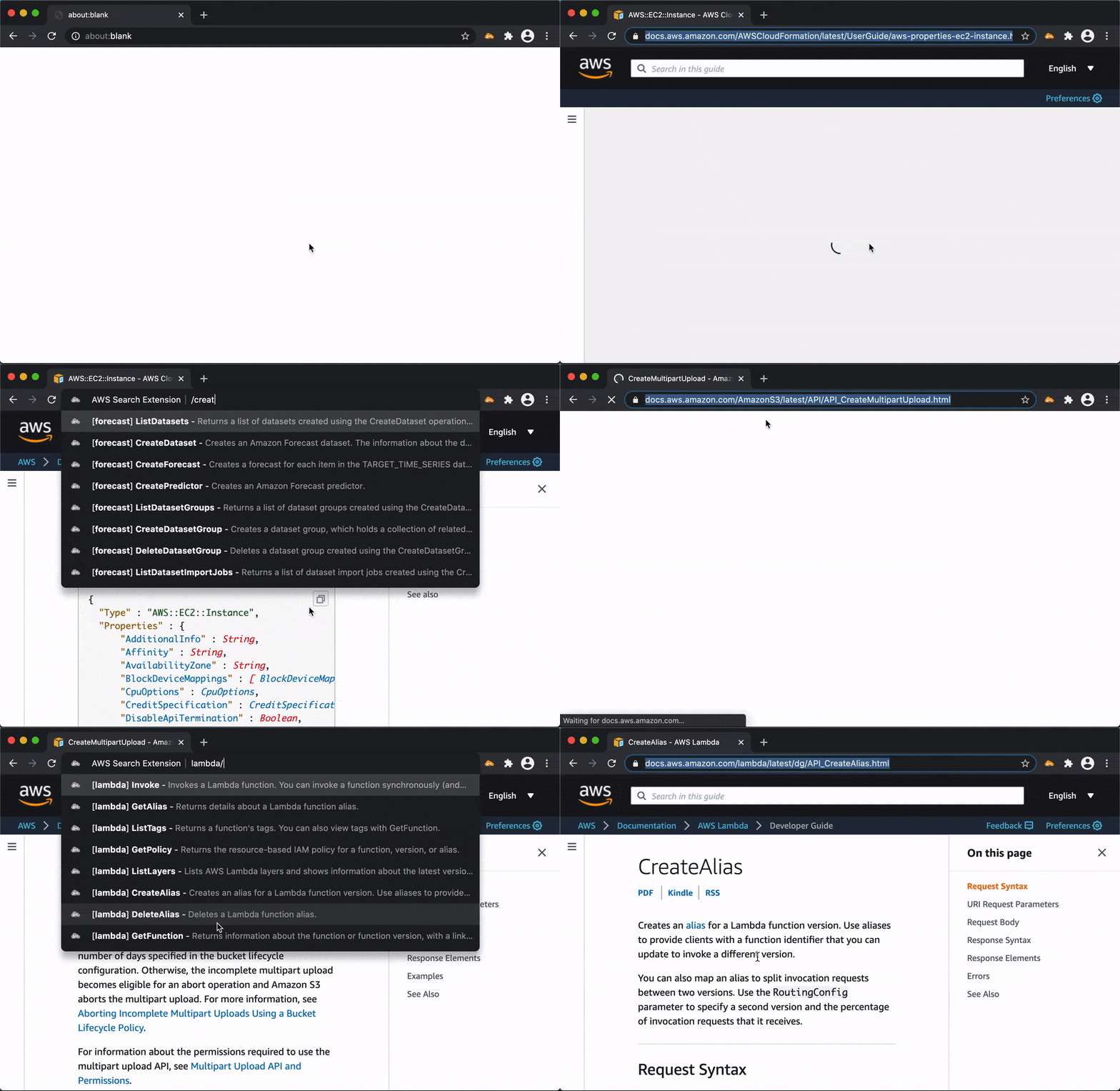
<p>So if you are interested in these topics: stay tuned!</p>]]></content><author><name>ZyanKLee</name></author><category term="GPU" /><category term="Ubuntu" /><category term="RX6800" /><summary type="html"><![CDATA[This is an opinionated guide on how I set up my computer which runs on an AMD Ryzen 7 5800X as well as an AMD RX6800 GPU. There are few guides out there that cover the topic of setting up systems with AMD GPUs, but I found none to my liking.]]></summary></entry><entry><title type="html">Browser search extension for AWS documentation</title><link href="https://zyanklee.de/2020/11/30/aws-documentation-search-extension/" rel="alternate" type="text/html" title="Browser search extension for AWS documentation" /><published>2020-11-30T03:00:00-06:00</published><updated>2020-11-30T03:00:00-06:00</updated><id>https://zyanklee.de/2020/11/30/aws-documentation-search-extension</id><content type="html" xml:base="https://zyanklee.de/2020/11/30/aws-documentation-search-extension/"><![CDATA[<p><a href="https://github.com/pitkley/aws-search-extension">AWS search extension</a> allows you to have a fuzzy search on the AWS documentation right from the address bar of your browser and is available for Google Chrome / Chromium, Microsoft Edge and Mozilla Firefox from the <a href="https://github.com/pitkley/aws-search-extension/releases/latest">github releases</a> (extension store submissions pending/planned).</p>

<p>If, for example, you want to know some specific detail on the <code class="language-plaintext highlighter-rouge">AWS::ECS::TaskDefinition</code> for the cloudformation infrastructure as code DSL you can just type: <code class="language-plaintext highlighter-rouge">aws a:e:taskdef</code> into your searchbar and hit enter.</p>

<p>See it in action for yourself:</p>

<p><img src="/images/aws-search-extension-demo.gif" alt="aws-search-extension in action" title="aws-search-extension in action" /></p>

<p>Although this extension is quite young it works surprisingly well, so give it a try!</p>]]></content><author><name>ZyanKLee</name></author><category term="Cloud" /><category term="Linux" /><category term="Browser" /><summary type="html"><![CDATA[AWS search extension allows you to have a fuzzy search on the AWS documentation right from the address bar of your browser and is available for Google Chrome / Chromium, Microsoft Edge and Mozilla Firefox from the github releases (extension store submissions pending/planned).]]></summary></entry><entry><title type="html">Unity keypress bug workaround</title><link href="https://zyanklee.de/2019/10/08/unity-engine-registers-keypresses-twice/" rel="alternate" type="text/html" title="Unity keypress bug workaround" /><published>2019-10-08T11:22:54-05:00</published><updated>2019-10-08T11:22:54-05:00</updated><id>https://zyanklee.de/2019/10/08/unity-engine-registers-keypresses-twice</id><content type="html" xml:base="https://zyanklee.de/2019/10/08/unity-engine-registers-keypresses-twice/"><![CDATA[<p>Some older - but widely used - version of the unity gaming engine has a bug that leads to some games registering
keypresses twice.</p>

<p>I encountered this problem repeatedly now and always forgot the workaround as soon as I implemented it. This blogpost
is a note to my future self, so I know where I can find this information, once I will need it again.</p>

<p>Within Steam click on the game entry and then on “Properties”. On tab “general” click on the “start options” button.
Paste the following in the input field:</p>

<div class="language-plaintext highlighter-rouge"><div class="highlight"><pre class="highlight"><code>XMODIFIERS='' %command%
</code></pre></div></div>

<p>This solves the problem.</p>]]></content><author><name>ZyanKLee</name></author><category term="Gaming" /><category term="Linux" /><summary type="html"><![CDATA[Some older - but widely used - version of the unity gaming engine has a bug that leads to some games registering keypresses twice.]]></summary></entry><entry><title type="html">HowTo: Install OpenARC from src</title><link href="https://zyanklee.de/2018/05/28/howto-install-openarc-from-src/" rel="alternate" type="text/html" title="HowTo: Install OpenARC from src" /><published>2018-05-30T05:30:00-05:00</published><updated>2018-05-30T05:30:00-05:00</updated><id>https://zyanklee.de/2018/05/28/howto-install-openarc-from-src</id><content type="html" xml:base="https://zyanklee.de/2018/05/28/howto-install-openarc-from-src/"><![CDATA[<p>This was today tested by me on Ubuntu Xenial 16.04 LTS with commit <a href="https://github.com/trusteddomainproject/OpenARC/tree/94c7639bd4c03da736b599dd2f9f108722621e7b" target="_blank" rel="noopener">#94c7639</a></p>

<div class="language-plaintext highlighter-rouge"><div class="highlight"><pre class="highlight"><code># apt-get install autotools-dev pkg-config autoconf automake libtool libbsd-dev libssl-dev libopendkim-dev -y

$ git clone https://github.com/trusteddomainproject/OpenARC.git
$ cd OpenARC/
$ git checkout develop
$ git fetch --all
$ git pull

$ autoreconf -fvi
$ ./configure
$ make
$ sudo make install

# echo "/usr/local/lib" &gt;&gt; /etc/ld.so.conf.d/x86_64-linux-gnu.conf
# ldconfig
</code></pre></div></div>

<p><em>EDIT:</em></p>

<p>If you rather install some deb packages have a look at this
<a href="https://build.opensuse.org/package/binaries/home:andreasschulze/openarc/">OBS repository</a>.
I did not test these packages and do not know Andreas Schulze, though.</p>]]></content><author><name>ZyanKLee</name></author><category term="OpenSource" /><category term="Software" /><summary type="html"><![CDATA[This was today tested by me on Ubuntu Xenial 16.04 LTS with commit #94c7639]]></summary></entry><entry><title type="html">Howto purge plenty of spam comments</title><link href="https://zyanklee.de/2017/11/06/howto-purge-plenty-of-spam-comments/" rel="alternate" type="text/html" title="Howto purge plenty of spam comments" /><published>2017-11-06T16:20:54-06:00</published><updated>2017-11-06T16:20:54-06:00</updated><id>https://zyanklee.de/2017/11/06/howto-purge-plenty-of-spam-comments</id><content type="html" xml:base="https://zyanklee.de/2017/11/06/howto-purge-plenty-of-spam-comments/"><![CDATA[<p>Over the years plenty of spam comments piled up in zyanklee.de’s database (around 2k). Deleting them all manually would have been a massive chore, but lately I found help in the disguise of <strong>wp cli</strong> (<a href="https://wp-cli.org/">https://wp-cli.org/</a>).</p>

<p>Deletion of this many comments took me a few seconds:</p>

<div class="language-plaintext highlighter-rouge"><div class="highlight"><pre class="highlight"><code>wp comment list --field=comment_ID --status=spam | xargs wp comment delete --force
</code></pre></div></div>]]></content><author><name>ZyanKLee</name></author><category term="OpenSource" /><category term="Software" /><category term="cli" /><category term="commandline" /><category term="tools" /><category term="wordpress" /><summary type="html"><![CDATA[Over the years plenty of spam comments piled up in zyanklee.de’s database (around 2k). Deleting them all manually would have been a massive chore, but lately I found help in the disguise of wp cli (https://wp-cli.org/).]]></summary></entry><entry><title type="html">howto backup huge MySQL servers?</title><link href="https://zyanklee.de/2015/08/22/howto-backup-huge-mysql-servers/" rel="alternate" type="text/html" title="howto backup huge MySQL servers?" /><published>2015-08-22T18:29:12-05:00</published><updated>2015-08-22T18:29:12-05:00</updated><id>https://zyanklee.de/2015/08/22/howto-backup-huge-mysql-servers</id><content type="html" xml:base="https://zyanklee.de/2015/08/22/howto-backup-huge-mysql-servers/"><![CDATA[<p>How to backup huge mysql myisam databases with a massive load of tables?</p>

<p>I encountered the backup of database servers that hold on to some hundreds of database schemas with each about one hundred tables while having some hundred gigabytes of data in them as a big problem in mysql servers.</p>

<p>There are some issues with that:</p>

<ul>
  <li>
    <p>shutting down mysql may take up to an hour until all opened file handles have been closed</p>
  </li>
  <li>
    <p>mysqldump’ing all the databases and tables takes several hours</p>
  </li>
  <li>
    <p>uptime is mission critical</p>
  </li>
</ul>

<p>Tonight I stumbled upon two approaches:</p>

<p><strong>Filesystem Snapshots</strong></p>

<p>I thought of that option before, though never followed that thought till the very end. While searching for other approaches that might seem fit for at least testing them out, I found this small line:</p>

<p><code class="language-plaintext highlighter-rouge">echo "FLUSH TABLES WITH READ LOCK; SYSTEM /path/to/helper/backupscript.sh; UNLOCK TABLES;" | mysql -u &lt;user&gt; -p &lt;password&gt;</code></p>

<p>(http://dev.mysql.com/doc/refman/5.1/en/backup-methods.html at the third comment at the time of writing of this article)</p>

<p>In our case we could use this line as part of our backup script and instead of „/path/to/helper/backupscript.sh“ we would run a wrapper script to create a snapshot of the underlying LVM.</p>

<p><strong>Maatkit’s mk-parallel-dump</strong></p>

<p>The former maatkit was incorporated into the percona toolkit and the mk-parallel-dump and mk-parallel-restore were dropped. But luckily there are some backups on github. For example: https://github.com/ets/maatkit</p>

<p>There you can find a slightly enhanced version of the latest maatkit.</p>

<p>mk-parallel-dump might be an option for those older database servers, that lack a snapshot-able filesystem.</p>

<p><strong>Disclaimer</strong></p>

<p>Though I did not yet test any of these options myself. As soon as I tested them, I will do a new article on them.</p>]]></content><author><name>admin</name></author><category term="Linux" /><category term="Software" /><category term="Technik" /><category term="backup" /><category term="mysql" /><summary type="html"><![CDATA[How to backup huge mysql myisam databases with a massive load of tables? I encountered the backup of database servers that hold on to some hundreds of database schemas with each about one hundred tables while having some hundred gigabytes of data in them as a big problem in mysql servers.]]></summary></entry><entry><title type="html">HowTo: build the jenkins vagrant-plugin</title><link href="https://zyanklee.de/2013/12/10/howto-build-the-jenkins-vagrant-plugin/" rel="alternate" type="text/html" title="HowTo: build the jenkins vagrant-plugin" /><published>2013-12-10T05:41:31-06:00</published><updated>2013-12-10T05:41:31-06:00</updated><id>https://zyanklee.de/2013/12/10/howto-build-the-jenkins-vagrant-plugin</id><content type="html" xml:base="https://zyanklee.de/2013/12/10/howto-build-the-jenkins-vagrant-plugin/"><![CDATA[<p>At present I am preparing some of the tools helpfull/necessary for continuous integration: jenkins, vagrant, gitlab, jira and puppet.</p>

<p>To make the first two of those work nicely together there exists a jenkins plugin called vagrant-plugin at <a href="https://github.com/rtyler/vagrant-plugin">rtyler/vagrant-plugin</a> , <a href="https://github.com/smartlogic/vagrant-plugin">smartlogic/vagrant-plugin</a> and <a href="https://github.com/aberrios85/vagrant-plugin">aberrios85/vagrant-plugin</a></p>

<p>I decided to use the last version, as the original plugin supports only very aged versions of jenkins and vagrant.</p>

<p>This is how the plugin can be build into a hpi file: (validated by hours of trial and error)</p>

<div class="language-plaintext highlighter-rouge"><div class="highlight"><pre class="highlight"><code># install rvm and jruby in one command
curl -sSL https://get.rvm.io | bash -s stable --ruby=jruby
# activate rvm
source ~/.rvm/scripts/rvm
# get the vagrant-plugin sources
git clone https://github.com/aberrios85/vagrant-plugin.git
cd vagrant-plugin
# install needed gems
bundle install
# build the whole bunch
jpi build
</code></pre></div></div>

<p>Now you can install the plugin <code class="language-plaintext highlighter-rouge">pkg/vagrant.hpi</code> into your jenkins. But pay attention – depending on your webserver configuration you might need to increase settings … for example „client_max_body_size“ in nginx, if you want to use the upload feature of the jenkins web interface.</p>]]></content><author><name>ZyanKLee</name></author><category term="OpenSource" /><category term="Software" /><category term="ci" /><category term="jenkins" /><category term="vagrant" /><summary type="html"><![CDATA[At present I am preparing some of the tools helpfull/necessary for continuous integration: jenkins, vagrant, gitlab, jira and puppet.]]></summary></entry><entry><title type="html">Ingress Portal Finder</title><link href="https://zyanklee.de/2013/04/30/ingress-portal-finder/" rel="alternate" type="text/html" title="Ingress Portal Finder" /><published>2013-04-30T11:01:27-05:00</published><updated>2013-04-30T11:01:27-05:00</updated><id>https://zyanklee.de/2013/04/30/ingress-portal-finder</id><content type="html" xml:base="https://zyanklee.de/2013/04/30/ingress-portal-finder/"><![CDATA[<p>As mindon has been asked to take down the chrome extension „Ingress Portals Finder“, just a few minutes ago clamburger forked the project repository on github and it seems he intends to carry on the torch for mindon:</p>

<p><a href="https://github.com/clamburger/ingress-portal-finder" title="https://github.com/clamburger/ingress-portal-finder" target="_blank">https://github.com/clamburger/ingress-portal-finder<br /> </a></p>

<p>New build of the project is available as well.</p>]]></content><author><name>ZyanKLee</name></author><category term="Ingress Tools" /><category term="3rdparty" /><category term="ingress" /><category term="portalfinder" /><category term="tool" /><category term="utility" /><summary type="html"><![CDATA[As mindon has been asked to take down the chrome extension „Ingress Portals Finder“, just a few minutes ago clamburger forked the project repository on github and it seems he intends to carry on the torch for mindon:]]></summary></entry><entry><title type="html">Papa-Blog 002: Die ersten drei Monate</title><link href="https://zyanklee.de/2013/01/21/papa-blog-die-ersten-drei-monate/" rel="alternate" type="text/html" title="Papa-Blog 002: Die ersten drei Monate" /><published>2013-01-21T07:00:20-06:00</published><updated>2013-01-21T07:00:20-06:00</updated><id>https://zyanklee.de/2013/01/21/papa-blog-die-ersten-drei-monate</id><content type="html" xml:base="https://zyanklee.de/2013/01/21/papa-blog-die-ersten-drei-monate/"><![CDATA[<p>Ich war vom Tag der Geburt an in Elternzeit und zwar für die nächsten 12 Monate. Dies war Teil einer Abmachung zwischen mir und meiner Frau:</p>

<p>Wir würden nur dann jetzt schon ein Kind bekommen, wenn meine Frau nach der Geburt und dem obligatorischen Wochenbett wieder arbeiten gehen könne. Der Grund dafür war, dass sie ihr Studium gerade erst beendet und ihren ersten Job begonnen hatte. Die logische Konsequenz war: ich musste ran.</p>

<p>Also hatte ich mit meinem Chef und der Personalabteilung gesprochen, um die Bedingungen und Vorkehrungen für ein Jahr Elternzeit zu besprechen. Dank ihrer tollen Unterstützung war alles sehr einfach für mich: Lose Enden verknüpfen und aufarbeiten, eine Übergabe an meine zwei Stellvertreter durchführen, meine Zukunft für die Zeit nach meine Rückkehr planen. So kam ich dann also zu einem Stapel IT-Fachbücher auf meinem Schreibtisch hier Zuhause: lesen und lernen während der Elternzeit. Sollte hoffentlich machbar sein.</p>

<p>Die ersten acht Wochen nach der Geburt, so wussten wir schon lange, wären wir zu zweit Zuhause. Zeit die wichtig war: meine Frau sollte sich langsam wieder erholen und wir mussten uns alle aneinander gewöhnen und lernen mit den Veränderungen in unserem Leben umzugehen. Glücklicherweise wurden aus den acht Wochen drei volle Monate, da der Auftraggeber des Arbeitgebers meiner Frau über die Feiertage und den Jahreswechsel das Werk schließt. Sehr viele Mitarbeiter nehmen zusätzlich noch länger Urlaub und dadurch ist für fast einen Monat die Produktionsstadt bei Sindelfingen fast ausgestorben. In diesem Zeitraum zu arbeiten macht erfahrungsgemäß kaum Sinn.</p>

<p>Voller Neugier und freudiger Erwartung, welche Abenteuer uns mit Leander erwarten würden, starteten wir also in drei Monate gemeinsame Elternzeit. Abenteuerlich war die Zeit: Leander lernte viel in den ersten Monaten, Einiges war offensichtlich und Anderes hingegen geht fast unter.</p>

<p>Wenige Beispiele, um nur ein paar Dinge zu nennen: mit der eigenen Verdauung und ihren Konsequenzen umgehen; die eigene Hand in den Mund schieben; einzelne Finger in den Mund nehmen; Objekte in unterschiedlichen Distanzen mit den Augen fixieren, bewegten Objekten mit den Augen folgen; Lächeln, vor Freude glucksen, weinen, schreien; auf sich aufmerksam machen, wenn ihm langweilig ist; usw.</p>

<p>Aber auch seine Eltern haben in den ersten Monaten eine Menge gelernt: einhändig Essen, einhändig Essen machen; einhändig aufs Klo gehen; einhändig Wäsche waschen und die Spülmaschine ein- bzw ausräumen; einhändig tippen, Tablets sind übrigens einfacher einhändig zu bedienen als Computer; Leander schreit anders, wenn er Hunger hat, als wenn er müde ist, als wenn er Langeweile hat oder Nähe braucht; wir verstehen nun, warum Eltern sich über die grundlegenden Körperfunktionen ihres Babys freuen können; Spielzeug ist nicht gleich Spielzeug; was gerade eben noch uninteressant war, kann in einer Minute schon zu heller Begeisterung führen; Menschen kommen eben doch mit weit weniger Schlaf aus – über einen kurzen Zeitraum zumindest, danach leidet unter anderem das Erinnerungsvermögen und das Sprachzentrum darunter („wann wurde Wie-heißt-er-doch-gleich zuletzt gepinkelt? … Ähhh, gewickelt? … Leander meine ich …“); nicht jedes Kind bekommt die sogenannten Dreimonatskoliken und wenn, dann sind sie nicht bei Jedem gleich stark.</p>

<p>Heute ist Leander über dreieinhalb Monate alt und ich bin seit zwei Wochen mit ihm allein Zuhause.</p>

<p>Wie es uns seit dem geht, lest ihr demnächst hier in der nächsten Folge von „<a href="https://zyanklee.de/category/papa-blog/" title="Papa-Blog">Papa-Blog</a>„.</p>]]></content><author><name>ZyanKLee</name></author><category term="Papa-Blog" /><category term="baby" /><category term="elternzeit" /><category term="papablog" /><category term="vater" /><summary type="html"><![CDATA[Ich war vom Tag der Geburt an in Elternzeit und zwar für die nächsten 12 Monate. Dies war Teil einer Abmachung zwischen mir und meiner Frau: Wir würden nur dann jetzt schon ein Kind bekommen, wenn meine Frau nach der Geburt und dem obligatorischen Wochenbett wieder arbeiten gehen könne. Der Grund dafür war, dass sie ihr Studium gerade erst beendet und ihren ersten Job begonnen hatte. Die logische Konsequenz war: ich musste ran.]]></summary></entry><entry><title type="html">Papa-Blog 001: Aller Anfang</title><link href="https://zyanklee.de/2013/01/21/papa-blog-aller-anfang/" rel="alternate" type="text/html" title="Papa-Blog 001: Aller Anfang" /><published>2013-01-21T06:00:14-06:00</published><updated>2013-01-21T06:00:14-06:00</updated><id>https://zyanklee.de/2013/01/21/papa-blog-aller-anfang</id><content type="html" xml:base="https://zyanklee.de/2013/01/21/papa-blog-aller-anfang/"><![CDATA[<p>Am Anfang war eine schöne und sehr beeindruckende Geburt. Ich selber war nur ein Statist in dieser Phase. Die Hauptrollen wurden durch meine Frau und unseren zu Beginn des Schauspiels noch ungeborenen Sohn belegt. Wir hatten bis hier her schon viel Glück gehabt: die Schwangerschaft verlief vollkommen unauffällig und unserem Sohn wurde beste Gesundheit bescheinigt… so weit dies durch Ultraschall-Untersuchungen festzustellen war.</p>

<p>Diese Umstände haben es uns ermöglicht die Geburt im Geburtshaus Stuttgart-Mitte zu erleben. Die Betreuung durch die Hebammen der Hebammen-Praxis war durchweg sehr angenehm und ermutigend, und geschah über fast die gesamte Schwangerschaft, da wir uns schon sehr früh dort angemeldet hatten.</p>

<p>So fuhren wir denn an einem Freitag Abend im Oktober nach Mitternacht mit dem Taxi in das Geburtshaus und wurden dort von der Hebamme unseres Vertrauens in den stimmungsvoll beleuchteten Räumen empfangen. Die nächsten Stunden vergingen wie im Drogenrausch (vermute ich…  hab mit Drogen nicht so viel Erfahrung). Um kurz nach vier haben wir dann Leander als neuen Erdenbürger begrüßt und um sieben Uhr waren wir auch schon wieder Zuhause.</p>

<p>Der eindrucksvollste Moment der Geburt fragt ihr? Nun, wir sind uns einig:</p>

<p>Leander hat uns sofort, in dem auf die eigentliche Geburt folgenden Moment, mit großen offenen Augen stumm und neugierig angeschaut.</p>

<p>Ab hier beginnt der erste Abschnitt meiner Geschichte als Vater-in-Vollzeit:</p>

<p><a href="https://zyanklee.de/2013/01/papa-blog-die-ersten-drei-monate/" title="Die ersten drei Monate">Die ersten drei Monate</a></p>]]></content><author><name>ZyanKLee</name></author><category term="Papa-Blog" /><category term="geburt" /><category term="papablog" /><category term="sohn" /><category term="vater" /><summary type="html"><![CDATA[Am Anfang war eine schöne und sehr beeindruckende Geburt. Ich selber war nur ein Statist in dieser Phase. Die Hauptrollen wurden durch meine Frau und unseren zu Beginn des Schauspiels noch ungeborenen Sohn belegt. Wir hatten bis hier her schon viel Glück gehabt: die Schwangerschaft verlief vollkommen unauffällig und unserem Sohn wurde beste Gesundheit bescheinigt… so weit dies durch Ultraschall-Untersuchungen festzustellen war.]]></summary></entry></feed>